Musical Rhythms with Math in Python
Let's talk about music programming! There are a million aspects to this subject, but today, we'll touch on generating rhythmic patterns with mathematical and combinatorial techniques. These include the generation of partitions, necklaces, and Euclidean patterns.
Stefan and J. Richard Hollos wrote an excellent little book called "Creating Rhythms" that has been turned into C, Perl, and Python. It features a number of algorithms that produce or modify lists of numbers or bit-vectors (of ones and zeroes). These can be beat onsets (the ones) and rests (the zeroes) of a rhythm. We'll check out these concepts with Python.
For each example, we will play what things sound like with MIDI, by using the mido Python package. And in order to actually hear the rhythms, we will need a MIDI synthesizer. For the simplest illustration, we can use fluidsynth. Of course, any MIDI capable synth will work.
Here's how I start fluidsynth on my mac in the terminal, in a separate session. It uses a generic soundfont file (sf2) that can be downloaded here (124MB zip).
fluidsynth -a coreaudio -m coremidi -g 2.0 ~/Music/soundfont/FluidR3_GM.sf2
So, how do Python and mido know what output port to use? There are a few ways, but with the mido package, you can do this:
import mido
n = mido.get_output_names()
print(n) # ['FluidSynth virtual port (89324)', ...]
This shows that fluidsynth is alive and ready for interaction.
Okay on with the show!
First-up, let's look at partition algorithms. With the part() function, we can generate all partitions of n, where n is 5, and the "parts" all add up to 5. Then taking one of these (say, the third element), we convert it to a binary sequence that can be interpreted as a rhythmic phrase, and play it 4 times.
import time
from music_creatingrhythms import Rhythms

r = Rhythms()

parts = r.part(5)
# [[1, 1, 1, 1, 1], [1, 1, 1, 2], [1, 1, 3], [1, 2, 2], [1, 4], [2, 3], [5]]
p = parts[2] # [1, 1, 3]

seq = r.int2b([p]) # [[1, 1, 1, 0, 0]]
Now we realize the rhythm:
import mido

port_name = sys.argv[1] if len(sys.argv) > 1 else 'USB MIDI'
port = mido.open_output(port_name)

snare = 40

for _ in range(4):
    for bit in seq[0]:
        if bit == 1:
            msg = mido.Message('note_on', note=snare, channel=9, velocity=100)
            port.send(msg)
            time.sleep(0.5)
            msg = mido.Message('note_off', note=snare, channel=9, velocity=0)
            port.send(msg)
        else:
            time.sleep(0.5)
With this shell command, we can hear what it sounds like:
python coder-legion-1.1.py 'FluidSynth virtual port (89324)'
Not terribly exciting yet! Also, the code is kind of klunky, but it illustrates things in a simple way. We can get all sophisticated and make a class when things get more complicated, of course. But for now, we'll try to keep things on the simple side.
Let's see what the "compositions" of a number reveal. According to the documentation, a composition of a number is "the set of combinatorial variations of the partitions of n with the duplicates removed."
Ok. Well the 7 partitions of 5 are:
[[1, 1, 1, 1, 1], [1, 1, 1, 2], [1, 1, 3], [1, 2, 2], [1, 4], [2, 3], [5]]
And the 16 compositions of 5 are:
[[1, 1, 1, 1, 1], [1, 1, 1, 2], [1, 1, 2, 1], [1, 1, 3], [1, 2, 1, 1], [1, 2, 2], [1, 3, 1], [1, 4], [2, 1, 1, 1], [2, 1, 2], [2, 2, 1], [2, 3], [3, 1, 1], [3, 2], [4, 1], [5]]
That is, the list of compositions has, not only the partition [1, 2, 2], but also its variations: [2, 1, 2] and [2, 2, 1]. Same with the other partitions. Selections from this list will produce possibly cool rhythms.
So returning to music now... Previously, we output directly to a named, open MIDI port. But going forward, we will write MIDI files to the disk. This takes a bit more code, as we shall see.
Here are the compositions of 5 turned into sequences, played by a snare drum, and written to the disk:
from mido import Message, MidiFile, MidiTrack, MetaMessage, bpm2tempo
from music_creatingrhythms import Rhythms

def play_single(sequence):
    global mid, track
    snare = 40
    channel = 9
    t = mid.ticks_per_beat // 2 # nb: 480 = quarter-note
    for bit in sequence:
        if bit == 1:
            msg = Message('note_on', note=snare, channel=channel, velocity=100, time=0)
            track.append(msg)
            msg = Message('note_off', note=snare, channel=channel, velocity=0, time=t)
            track.append(msg)
        else: # rest
            track.append(Message('note_on', note=snare, velocity=0, time=t))
            track.append(Message('note_off', note=snare, velocity=0, time=t))

if __name__ == '__main__':
    mid = MidiFile()
    track = MidiTrack()
    mid.tracks.append(track)
    tempo = bpm2tempo(120)
    track.append(MetaMessage('set_tempo', tempo=tempo, time=0))
    track.append(MetaMessage('time_signature', numerator=4, denominator=4, time=0))

    r = Rhythms()

    comps = r.compm(5, 3) # compositions of 5 with 3 elements
    seq = r.int2b(comps)

    for s in seq:
        play_single(s)

    mid.save('coder-legion-2.1.mid')
In order to play the MIDI file that is produced, we can use fluidsynth like this:
fluidsynth -i ~/Music/soundfont/FluidR3_GM.sf2 coder-legion-2.1.mid
A little better. Like a syncopated snare solo.
Sidebar
Another way to play the MIDI file is to use timidity. On my mac, with the soundfont specified in the timidity.cfg configuration file, this would be:
timidity -c ~/timidity.cfg -Od coder-legion-2.1.mid
To convert a MIDI file to an mp3 (or other audio formats), I do this:
timidity -c ~/timidity.cfg coder-legion-2.1.mid -Ow -o - | ffmpeg -i - -acodec libmp3lame -ab 64k coder-legion-2.1.mp3
Ok. Enough technical details! What if we want a kick bass drum and hi-hats, too? Refactor time…
import random
from mido import Message, MidiFile, MidiTrack, MetaMessage, bpm2tempo
from music_creatingrhythms import Rhythms

def open_mid():
    mid = MidiFile()
    track = MidiTrack()
    mid.tracks.append(track)
    tempo = bpm2tempo(120)
    track.append(MetaMessage('set_tempo', tempo=tempo, time=0))
    track.append(MetaMessage('time_signature', numerator=4, denominator=4, time=0))
    return mid, track

def play_simul(notes):
    global mid, track
    channel = 9
    duration = mid.ticks_per_beat // 4 # nb: 480 = quarter-note
    for i, n in enumerate(notes):
        bit = notes[n]
        t = duration if i == 0 else 0
        if bit == 1:
            msg = Message('note_on', note=n, channel=channel, velocity=100, time=t)
            track.append(msg)
        else: # rest
            track.append(Message('note_on', note=n, velocity=0, time=t))
    for i, n in enumerate(notes):
        bit = notes[n]
        t = duration if i == 0 else 0
        if bit == 1:
            msg = Message('note_off', note=n, channel=channel, velocity=0, time=t)
            track.append(msg)
        else: # rest
            track.append(Message('note_off', note=n, velocity=0, time=t))

if __name__ == '__main__':
    mid, track = open_mid()

    kick = 36
    snare = 40
    hihat = 42
    repeat = 16

    r = Rhythms()

    s_comps = r.compm(4, 2) # snare compositions of 4 with 2 elements
    # [[1, 3], [2, 2], [3, 1]]
    s_seq = r.int2b(s_comps)
    # [[1, 1, 0, 0], [1, 0, 1, 0], [1, 0, 0, 1]]

    k_comps = r.compm(4, 3) # kick compositions of 4 with 3 elements
    # [[1, 1, 2], [1, 2, 1], [2, 1, 1]]
    k_seq = r.int2b(k_comps)
    # [[1, 1, 1, 0], [1, 1, 0, 1], [1, 0, 1, 1]]

    h_seq = [[1, 1, 1, 1]] # hihat

    for _ in range(repeat):
        s_choice = random.choice(s_seq)
        k_choice = random.choice(k_seq)
        for i in range(len(s_choice)):
            simul = {
                snare: s_choice[i],
                kick: k_choice[i],
                hihat: 1,
            }
            print(simul)
            play_simul(simul)

    mid.save('coder-legion-3.mid')
Here we play generated kick and snare patterns, along with a steady hi-hat. A bit of gymnastics happens in the repeat loop in order to play simultaneous notes. Corresponding changes are made to the play_single() function, which is renamed to play_simul(). This sends note_on messages for all the simultanous notes, followed by corresponding note_off messages.
Notice how even a little musical change involves a bunch of code, sometimes? Hrm. Also, every programmer is going to do things differently. So, YMMV. :D
Next up, let's look at rhythmic "necklaces." Here we find many grooves of the world.
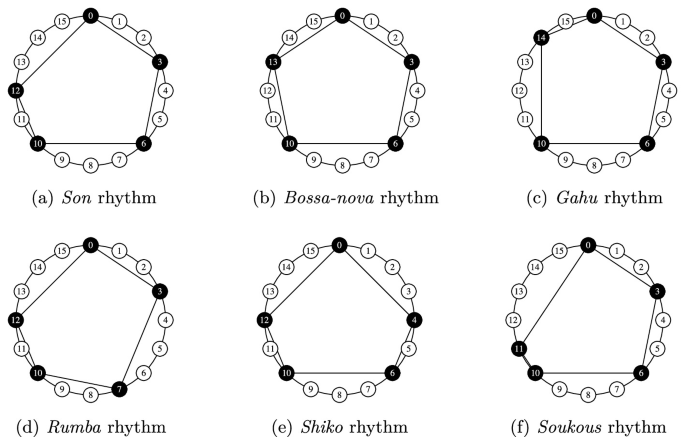
Image from The Geometry of Musical Rhythm
Rhythm necklaces are circular diagrams of equally spaced, connected nodes. A necklace is a lexicographical ordering with no rotational duplicates. For instance, the necklaces of 3 beats are [[1, 1, 1], [1, 1, 0], [1, 0, 0], [0, 0, 0]]. Notice that there is no [1, 0, 1] or [0, 1, 1]. Also, there are no rotated versions of [1, 0, 0], either.
So, how many 16 beat rhythm necklaces are there?
necklaces = r.neck(16)
print(len(necklaces)) # 4116 of 'em!
Ok. Let's generate necklaces of 8 instead, pull a random choice, and play the pattern with a world percussion instrument.
Also, let's simplify the code a bit.
# ...

if __name__ == '__main__':
    mid, track = open_mid()

    r = Rhythms()

    necklaces = r.neck(8) # all necklaces of 8 beats
    choice = random.choice(necklaces)
    print(choice)

    for _ in range(4):
        play_single(choice)

    mid.save('coder-legion-4.1.mid')
Here we choose from all necklaces. But note that includes the sequence with all ones and the sequence with all zeroes, also. More sophisticated code might skip these.
More interesting would be playing simultaneous beats.
# ...

if __name__ == '__main__':
    mid, track = open_mid()

    claves = 75
    hi_conga = 63
    low_conga = 64
    repeat = 6
    beats = 8

    r = Rhythms()

    necklaces = r.neck(beats) # all necklaces of 16 beats

    x_choice = random.choice(necklaces)
    y_choice = random.choice(necklaces)
    z_choice = random.choice(necklaces)

    for _ in range(repeat):
        for i in range(len(x_choice)):
            simul = {
                claves: x_choice[i],
                hi_conga: y_choice[i],
                low_conga: z_choice[i],
            }
            print(simul)
            play_simul(simul)

    mid.save('coder-legion-4.2.mid')
And that sounds like:
How about Euclidean patterns? What are they, and why are they named for a geometer?
Euclidean patterns are a set number of positions P that are filled with a number of beats Q that is less than or equal to P. They are named for Euclid because they are generated by applying the "Euclidean algorithm," which was originally designed to find the greatest common divisor (GCD) of two numbers, to distribute musical beats as evenly as possible.
# ...

if __name__ == '__main__':
    mid, track = open_mid()

    kick = 36
    snare = 40
    hihat = 42
    repeat = 4
    beats = 16

    r = Rhythms()

    s_pat = r.rotate_n(4, r.euclid(2, beats)) # snare
    k_pat = r.euclid(2, beats) # kick
    h_pat = r.euclid(11, beats) # hihats

    for _ in range(repeat):
        for i in range(beats):
            simul = {
                snare: s_pat[i],
                kick: k_pat[i],
                hihat: h_pat[i],
            }
            print(simul)
            play_simul(simul)

    mid.save('coder-legion-5.mid')
Now we're talkin' - an actual drum groove! To reiterate, the euclid() method distributes a number of beats, like 2 or 11 over the number of beats, 16. The kick and snare use the same arguments, but the snare pattern is rotated by 4 beats, so that they alternate.
So what have we learned today?
That you can use mathematical sequences to represent rhythmic patterns.
That you can play an entire sequence or simultaneous notes with MIDI.
That even small musical things, sometimes require a significant amount of code.
References:
About the author
Gene is a long-time musician and software engineer. His personal website is https://www.ology.net/ and pypi packages.